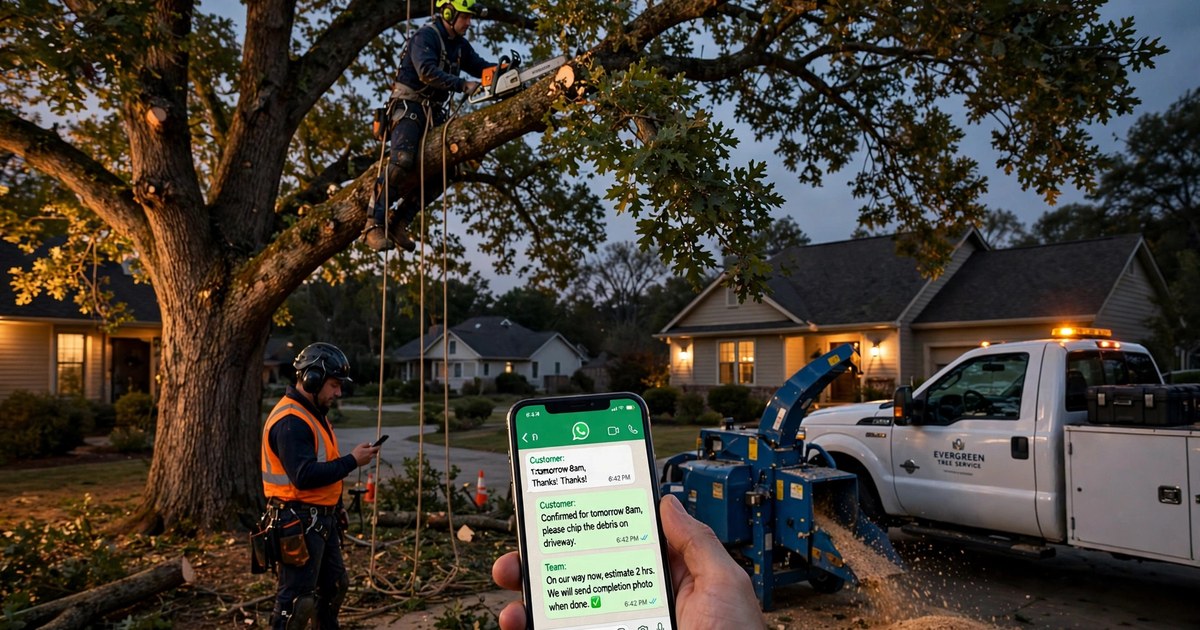
It was half past nine on a Tuesday night when the oak over Mrs. Henderson's driveway started to lean a little further than it had that morning. She did what most people do now. She did not ring around. She opened WhatsApp, found the tree company her neighbour had used, and sent a photo of the tree with one line: "Is this dangerous? Can someone come tomorrow?"
The crew was still out on a storm-clearance job, chainsaws running, phones in the truck. By the time anyone read her message the next morning, she had already booked the company that answered her at 9:47 PM. That company did not have more staff. It had an assistant on WhatsApp that answered while the crew worked.
If you run a tree service, this is your normal week. Your customers message when they are worried, which is usually in the evening, after a storm, or the morning they notice a crack they swear was not there yesterday. Your crew is up a tree, on a roof line, or driving between jobs. Somebody has to answer, and the answer has to be good, because a worried homeowner with a leaning tree does not wait politely for office hours.
This guide shows you, step by step, how WhatsApp automation handles that first conversation for a tree service: the photo intake, the safety triage, the ballpark price, the booked site visit, and the job-day messages that keep your phone quiet. You will also see what it must never do, because tree work has safety lines that no bot should cross. By the end you will have a two-week plan to set it up without stopping a single job.
For the wider picture of how WhatsApp booking works for outdoor trades, the landscapers guide covers seasonal contracts and recurring visits, which pair well with the storm and removal work here. And if you have never connected a business number to WhatsApp properly, start with the WhatsApp Business API setup guide before you automate anything.
The quick answer
WhatsApp automation for tree service companies is an AI assistant on your business WhatsApp number that answers customers instantly, day and night. It asks for the right tree photos, sorts urgent storm damage from routine pruning, gives a ballpark price range, books a site visit and sends job-day updates. A hazardous tree is never finally priced from photos.
Why tree calls are different from every other trade's calls
A plumber's customer can wait until morning with a dripping tap. A tree customer often cannot, or believes they cannot, and that belief drives the whole conversation. Three things make tree enquiries different.
First, fear is the trigger. A leaning tree, a split trunk, a limb hanging over a bedroom roof — these are not convenience purchases. The customer is picturing damage, not shopping around for fun. The first reply needs to calm them down and give them something useful to do, not just say "we will get back to you."
Second, the job cannot be priced from a price list the way mowing can. Every tree is a different height, a different lean, a different distance from the house, a different access problem. A flat price on a website is either wrong or so wide it means nothing. What customers actually need is a range with clear conditions, and a fast route to a site visit where the real price is set.
Third, safety decides the order of work. Some jobs jump the queue because a tree is on a roof or across a driveway. Some jobs must wait for the utility company because lines are involved. Some jobs need a permit before a saw starts. An assistant that treats every enquiry as "book the next slot" will book you into trouble. The triage matters more than the booking.
None of this means you need to answer the phone at midnight yourself. It means the thing answering at midnight needs to know the difference between a worried customer and a dangerous tree.
Here is what a good automated conversation looks like at 9:47 PM, when the crew is still on a job and the homeowner is standing in her driveway in the rain.
Customer: "Hi, the big oak in our front garden is leaning towards the house after the storm. There is a crack in the trunk. Can someone come tomorrow?"
Assistant: "Thanks for the message, I can help right away. First, please stay clear of the tree and do not park under it tonight. Can you send me three photos: one of the whole tree from across the street, one of the crack up close, and one showing what the tree leans over? Also, is the tree touching any power lines, or resting on the roof?"
Customer sends three photos and replies: "Not touching lines. It leans over the driveway, not the house. The crack is on the side facing the road."
Assistant: "Thank you, that helps a lot. From what you describe, this needs a site visit before anyone works on it, and it should happen tomorrow. I can hold a visit window tomorrow between 8 and 10 AM for our arborist to assess it in person. Would you like me to hold that? We will confirm the final price on site, because a cracked trunk is never priced from photos alone."
Notice what happened. The customer got a safety instruction first, not a sales pitch. The assistant asked for the photos that actually change the decision. It did not quote a firm price for a cracked tree, and it did not promise a removal tomorrow — it promised an assessment tomorrow, which is the honest thing. And the customer, who ten minutes earlier was about to ring the next company on the list, now has a held slot and a reason to stop searching.
That is the whole game. Not clever technology. A fast, careful, honest first ten minutes.
How a tree photo becomes a quote
Most tree companies that try WhatsApp automation get this part wrong, because they ask for "a photo" and get one useless close-up of bark. The photo intake needs to be specific, and the customer needs to know why you are asking.
The five photos that actually help are:
- The whole tree from a distance, so you can see its height, shape, and lean.
- The base of the trunk, showing the ground, any lifting roots, and how close it stands to paths or walls.
- The problem itself up close: the crack, the split limb, the dead top, the fungus at the base.
- What the tree overhangs: the roof, the driveway, the neighbour's fence, the garden shed.
- The access: the gate width, the driveway, whether a truck and chipper can get in, and whether there is anywhere to put the debris.
The assistant asks for these one at a time, in plain language, and explains each one in a sentence. "A photo from across the street tells us how tall it is and which way it leans." Customers cooperate when they understand the reason. They send blurry bark close-ups when nobody tells them what matters.
With those photos, the assistant can do three useful things. It can sort the job into a type: pruning, single removal, storm clearance, or stump grinding. It can give a ballpark range for that type, with the conditions stated openly. And it can flag the cases that need a person right now: power lines, a tree on a building, a blocked road, a hanging limb over a pavement. Those go straight to a human, day or night, with the photos attached.
What it cannot do, and must say so, is set a final price for a hazardous or complex tree from photos. A photo hides root damage, internal rot, and how much of the crown is dead. Any company that gives a firm price for a cracked trunk from three photos is guessing, and the customer pays for the guess later when the price changes on site. Your assistant saying "we price this on site" is not losing the sale. It is the reason the customer trusts you over the company that quoted blind.
Storm damage triage: crew today, visit this week, or utility company first
Storm work is where tree companies make their reputation and where a bad first reply costs the most. After a storm, your inbox fills with everything from a fallen branch on a lawn to a tree across a road. Answering in the order messages arrived is the wrong order. The assistant sorts every storm enquiry into one of three lanes.
Lane one is crew today. The tree is on a roof, across a driveway, blocking a road, or has a hanging limb over a place people walk. The assistant takes the address, the photos, and access details, tells the customer to keep clear and not to touch anything, and passes it to a human immediately with a "today" flag. It does not book a routine slot for these. It raises them.
Lane two is visit this week. The tree is damaged but stable: a split limb that is not hanging over anything vital, a leaning tree that has not moved further, storm debris that can wait a few days. The assistant books a site visit in the next few days, gives the customer the safety basics, and tells them what will happen at the visit.
Lane three is not ours yet. Power lines are involved, or the tree belongs to the council, or a permit is needed before work starts. The assistant says so plainly, tells the customer who to call first, and offers to book the work once that step is clear. This feels like losing a job. It is actually the opposite. The customer remembers the company that told them the truth instead of booking a crew into a live-lines situation.
Your customers are already on WhatsApp
ReplyPilot turns your business WhatsApp into an always-on front desk — instant answers, real bookings in your calendar, and a clean handoff to you the moment a conversation needs a person.
Ask on WhatsApp — it's freeOne more thing the assistant does on storm nights that a tired human forgets: it tells every customer the same safety lines, every time. Stay clear of the tree. Do not park under it. Do not try to cut a hanging limb yourself. Do not touch anything near lines. Those four sentences, sent automatically, are worth more than any marketing.
From a booked visit to a crew on site
The site visit is where the money is made or lost, and the automation earns its keep before the visit as much as after it. Once a slot is held, the assistant sends a confirmation with the visit window, the name of the person coming, and one request: please make sure the gate is unlocked and dogs are inside. Small detail, big time saver. Crews lose hours every week to locked gates and loose dogs.
The day before the visit, a reminder goes out with a one-tap way to move the slot. The morning of the visit, the customer gets a message when the arborist is on the way, with a rough arrival time. After the visit, the written quote follows on WhatsApp, not buried in an email inbox, with the price, what is included, and how long it is valid. Customers accept written quotes on WhatsApp faster than emailed PDFs, because the quote is sitting in the same thread as the photos they sent.
If the job is booked, the same thread carries the whole job. The assistant confirms the date, tells the customer what to move (cars, garden furniture, anything under the drop zone), and on job day sends the crew-on-the-way message, then a finished message with a photo of the cleared site, then the payment link, then the review ask that evening. The customer never has to ring you to ask where the crew is. Your phone stays quiet because the chat is doing the talking.
That quiet is the point. A tree crew's office is usually one person doing three jobs. Every "are you on your way?" call is time that person is not quoting the next job. Automation does not replace that person. It stops them drowning in status questions.
A tree job is not one service with one crew. The chat needs to work out, before anyone leaves the yard, whether this job needs a climber, a bucket truck, or a crane, and whether the chipper and truck can even get in. Getting this wrong wastes a day: a crew arrives, finds a narrow side gate and a tree over a conservatory, and drives home to fetch different kit.
The assistant asks the access questions early, while the customer is still engaged. How wide is the side gate? Can a truck get down the drive? Is there anywhere to stack debris? Is the tree over a building, a greenhouse, a neighbour's garden? Does anything need protecting — a new patio, a pond, a prized hedge? The answers go into the job note, so the crew leader reads them before loading the truck.
Permits and lines get the same early treatment. Some areas need permission before a protected tree is touched, and the assistant asks whether the tree has a preservation order on it — many homeowners have no idea, and finding out on job day stops the job. If lines are near, the assistant flags the utility check before a date is promised. None of this is glamorous. All of it is the difference between a crew that works all day and a crew that spends the morning driving back for the right equipment.
Seasonal work that fills the quiet weeks
Tree work has seasons, and the quiet weeks are where automation quietly pays for itself. After the storm rush, most companies go quiet until the next blow. The assistant keeps the pipeline warm without anyone remembering to do it.
In late autumn, it messages past customers whose trees were pruned last year and asks whether they want the same visit booked before winter storms. In spring, it reminds customers with trees over roofs that a pre-storm check now is cheaper than an emergency call later. After every completed job, it asks about the stump: most customers forget stump grinding exists until they trip over the stump, and a message two weeks after the removal, with a photo of what a ground stump looks like, converts a surprising number of them.
It also collects reviews at the right moment: the evening of the job, with a photo of the finished site, when the customer is standing in a garden that looks better than it did that morning. That is when people write the good reviews. A week later, they have forgotten. The assistant does not forget.
What automation must never do in tree work
This section matters more than the rest, because tree work can hurt people, and a careless bot can cause real harm. Put these lines in writing before you switch anything on.
Never price a hazardous tree finally from photos. Ballpark ranges are fine, with conditions. Firm prices for cracked, leaning, or storm-damaged trees are set on site, by a person, after seeing the tree.
Never tell a customer a tree is safe. The assistant can say "this sounds like it needs a visit soon" or "keep clear and we will assess it tomorrow." It cannot say "that looks fine, leave it." Only a site visit says that.
Never advise a customer to cut anything themselves. No instructions for removing a hanging limb, no "you could just trim that branch." The safety message is always: stay clear, leave it to the crew.
Never promise a date before permits and lines are checked. A promised date that moves twice is worse than an honest "we will confirm once the check is done."
Never let the bot pretend to be a person. Customers should know they are talking to the company's assistant, and a human should be one message away at all times. The moment a customer says "I want to talk to a person," the chat hands over, with the photos and the story attached, so they never have to start again.
These are not edge cases. They are the rules that keep a tree company's automation trustworthy, and trust is the only reason a homeowner picks you over the next listing.
Do-it-yourself replies, an office person, or automation
Most tree companies sit in one of three places, and it helps to see them honestly before choosing.
Do-it-yourself replies mean the owner answers WhatsApp between jobs, on the truck, at night, whenever there is a gap. It is free and personal, and it breaks the moment the company gets busy, which is exactly when the enquiries matter most. The storm week that could have doubled the order book becomes the week half the messages got answered three days late.
An office person means hiring someone to sit on the phone all day. It works well and costs a full wage before you have the volume to justify it. For a two-crew company, that wage is often the difference between profit and loss in a quiet month.
Automation means the assistant handles the first conversation, the triage, the photo intake, the booking, and the job-day messages, and a human steps in for the final price, the hazardous calls, and anything unusual. It costs a fraction of a wage, it works at midnight on storm nights, and it never forgets the reminder, the review ask, or the safety line. The honest downside is that it needs setting up properly: the questions, the price ranges, the handover rules. That setup is the two-week plan below, and it is a one-time job.
The closest thing on the market to a ready-made version of this is a vendor page written for landscapers, not tree companies, which shows the gap plainly: its sample chat prices weekly mowing, and it never touches hazard triage, cranes, or permits, because lawns do not have those problems. You can read that landscaper bot page to see what a generic outdoor-trade bot looks like, and then notice everything it leaves out for tree work. That missing middle is exactly what your own setup needs to cover.
Your two-week setup plan
Week one is questions and ranges, not technology. Day one and two, write down the ten questions your customers actually ask, and the answers you give every time. Day three, write the five photo requests and the reason for each, in your own words. Day four, set the ballpark ranges for pruning, single removal, storm clearance, and stump grinding, with the conditions that move a job up or down the range. Day five, write the safety lines and the handover rules: what goes to a human immediately, what gets booked, what waits for a permit or utility check. By the end of week one you have the brain of the assistant, written in plain language, and you have not touched any software.
Week two is the build and the test. Connect your business number, load the questions, ranges, and safety lines, and set the booking slots to match your real diary, not an ideal one. Then test it the way a customer would: send it a leaning-tree message at night, a stump question, a pruning enquiry, and a power-lines case, and check that each one lands in the right lane. Fix what is wrong, then run it for one week alongside your normal phone answering, so you can compare. If the storm-night messages get answered in minutes instead of hours, and the crew's phone stays quiet on job days, it is working. If a message lands in the wrong lane, fix the question that sent it there. That is the whole maintenance job, and it takes an hour a week.
One practical note on cost and help. A done-for-you setup, where someone builds the assistant around your questions, ranges, and diary and keeps it running, is priced as a one-time setup of $249, paid as $125 to start and $124 when it goes live, with an optional Care Plan at $99 a month for the ongoing tweaks, review follow-ups, and seasonal campaigns. That is the honest shape of it: a small fixed setup, then a modest monthly cost if you want someone else to mind it. Whether you build it yourself in two weeks or have it built for you, the questions and safety lines above are the same. The technology is the easy part. Knowing what your customers ask, and what must never be answered carelessly, is the real work.
And five mistakes to avoid while you set it up. The first mistake is answering fast but badly: a bot that replies instantly with "send us a photo" and nothing else, and then goes quiet. Speed without a next step is just a faster way to lose someone.
The second is pricing blind. A firm price from one photo, given to win the job, that doubles on site. The customer feels tricked, leaves a bad review, and tells the neighbours. A range with conditions, given honestly, keeps the customer even when the final price lands at the top of the range.
The third is booking before checking. A date promised, a crew sent, a protected tree or a live line discovered on arrival. The job stops, the customer is annoyed, and the crew's day is wasted. Permits and lines come before dates, every time.
The fourth is going quiet after the job. No finished photo, no payment link, no review ask, no stump follow-up. The customer liked the work and then never heard from the company again, until they needed another tree firm and picked the one that messaged them first.
The fifth is letting the bot pretend. Customers who discover they have been talking to a bot that acted like a person feel deceived, and tree customers, who are trusting you with something over their roof, do not forgive that easily. Say it is the company's assistant, hand over to a person the moment it matters, and the trust survives.
Frequently asked questions
Can WhatsApp automation really price a tree removal?
It can give a ballpark range by job type, with the conditions that move the price, and it can collect the photos and access details that make the site visit fast. It cannot set a final price for a hazardous, leaning, or storm-damaged tree from photos, and any system that claims to is guessing. The final price is set on site, by a person who has seen the tree.
What happens when a customer reports a tree on power lines?
The assistant tells them to stay clear, not to touch anything, and to contact the utility company first, then offers to book the work once the lines are dealt with. This is a safety lane, not a sales lane, and it goes to a human immediately with the photos attached.
Do customers mind talking to an assistant instead of a person?
In practice, no, as long as two things are true: the assistant says what it is, and a person is one message away. Customers mind waiting, being ignored, and repeating themselves. They do not mind a fast, honest assistant that books them a real visit and hands over cleanly when it matters.
How long does it take to set up for a small crew?
About two weeks if you follow the plan above: one week writing your questions, ranges, and safety lines, and one week building and testing. A one- or two-crew company does not need a bigger project than that. The setup is the same size whether you build it yourself or have it built for you.
Will automation work for stump grinding and pruning, not just emergencies?
Yes, and that is where it quietly earns its keep. Pruning reminders, pre-storm checks, and stump follow-ups after a removal are all messages that a busy crew forgets and an assistant never does. Emergency work wins the customer; the follow-up messages keep them.
Start with week one of the plan, on paper, before you buy or build anything. Write the ten questions, the five photo requests, the price ranges with their conditions, and the safety lines. That document is useful even if you never automate a single message, because it is also the script for whoever answers your phone.
Then, when you are ready to see it working on your own number, the natural next step is the free custom demo on the ReplyPilot site, where the same kind of assistant answers a tree-service enquiry live so you can judge it the way a customer would. You will find it at ReplyPilot. Watch what it asks, how it triages, and where it hands over, and compare it with the rules in this guide. If it passes your test, it will pass your customers' test too.